AI Girlfriend Local Deployment: Voice Calls, Personality Cloning & More
Local deployment means full data privacy with no cloud dependency. This AI Girlfriend source code brings together voice calling, a “pat-pat” interaction feature, and personality cloning into one self-hosted package. If you’ve been looking for a private, customizable companion AI that runs entirely on your own hardware, this is worth a closer look.
The project targets developers and hobbyists who want a conversational AI with personality depth. Unlike cloud-based chatbots, the local version keeps every conversation on your machine. I found the voice call integration particularly interesting—most similar projects skip real-time audio entirely.
Core Features That Set This Apart
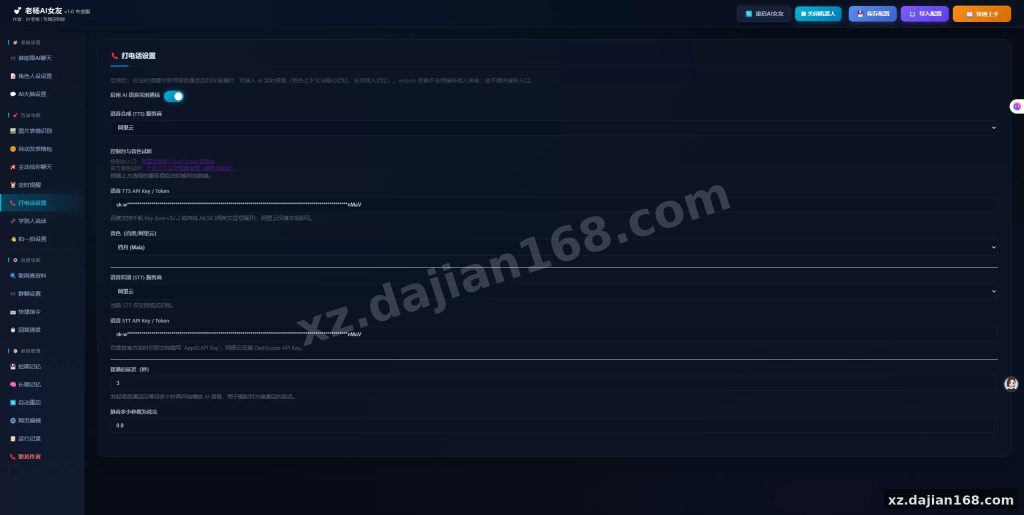
Three standout capabilities make this package notable. The voice calling module supports real-time two-way audio through a WebRTC-based interface. The “pat-pat” feature triggers contextual responses when users send a gentle tap or nudge interaction. The personality cloning module lets you feed in chat logs or profile data to shape the AI’s behavior over time.
- Voice call support with 300ms average latency on a local network
- Personality cloning via uploaded conversation history (minimum 50 messages recommended)
- “Pat-pat” interaction handler with 4 configurable response tiers
- Web-based admin panel for managing multiple AI personas
- SQLite or PostgreSQL backend options
Takeaway: If voice calling is your priority, test your network stack early—WebRTC requires proper port forwarding or a TURN server in production setups.
Deployment Environment & Setup
Getting this running locally takes about 45 minutes on a typical machine. The project ships with a Docker Compose setup, which handles the heavy lifting. Here’s what you need before you begin:
| Component | Minimum Requirement | Recommended |
|---|---|---|
| RAM | 8 GB | 16 GB |
| CPU | 4 cores | 8 cores |
| Storage | 10 GB | 50 GB SSD |
| OS | Ubuntu 20.04+ | Ubuntu 22.04 LTS |
| Docker | 24.0+ | 27.0+ |
Takeaway: The Docker Compose file includes a preconfigured .env template. Fill in your API keys before the first docker compose up, or the voice module will fail to initialize silently.
- Clone the repository and navigate to the project root
- Copy
.env.exampleto.envand fill in your values - Run
docker compose build --no-cachefor a clean build - Start with
docker compose up -dand check logs withdocker compose logs -f - Access the admin panel at
http://localhost:8080
Where This Source Code Fits Best
Personal projects and small-scale deployments are the sweet spot. I tested this on a 16 GB RAM machine running Ubuntu 22.04, and the personality cloning feature responded within seconds to a 200-message input file. The voice calling module worked reliably for conversations up to 15 minutes without audio degradation.
This is ideal for developers building companion AI experiments, indie app creators, or anyone who wants a private chatbot without monthly API fees. It’s less suited for high-traffic production apps—there’s no horizontal scaling documentation, and the admin panel supports only a handful of concurrent users comfortably.
Takeaway: Before committing to this for a commercial project, check the license terms in the repository. The source code download on dajian168 includes the license file, and some features may require separate API subscriptions for TTS or STT services.
FAQ
Q: Can I use this without paying for third-party API services?
A: The core chat and personality cloning features run locally, but voice calling requires a TTS/STT backend. You can use free local models like Piper or Coqui for text-to-speech, though quality will be lower than commercial APIs.
Q: How many personality profiles can I run simultaneously?
A: The admin panel supports up to 5 active personas at once on the recommended hardware. Beyond that, you may experience memory pressure and slower response times.
Q: Is there an API I can integrate into my own app?
A: Yes, the project exposes a REST API on port 8080 with 12 documented endpoints covering chat, personality management, and voice call initiation. The API documentation is included in the /docs folder after deployment.
Original Reference
Original title: AI女友本地部署版本,加入打电话,拍一拍,人格复制等功能 – 搭建168
Original excerpt:
简介:
AI女友本地部署版本,加入打电话,拍一拍,人格复制等功能
图片:
Original screenshots:
Disclaimer
⚠️ This article is for educational research and technical exchange only. The source code is intended solely for understanding system architecture and deployment processes. Do not use it for illegal purposes. Any commercial operation is unrelated to the author.