IDC Cloud Host Mall System v3.73 Source Code Download — Agent Sub-Stations, Dual Hypervisor Panel
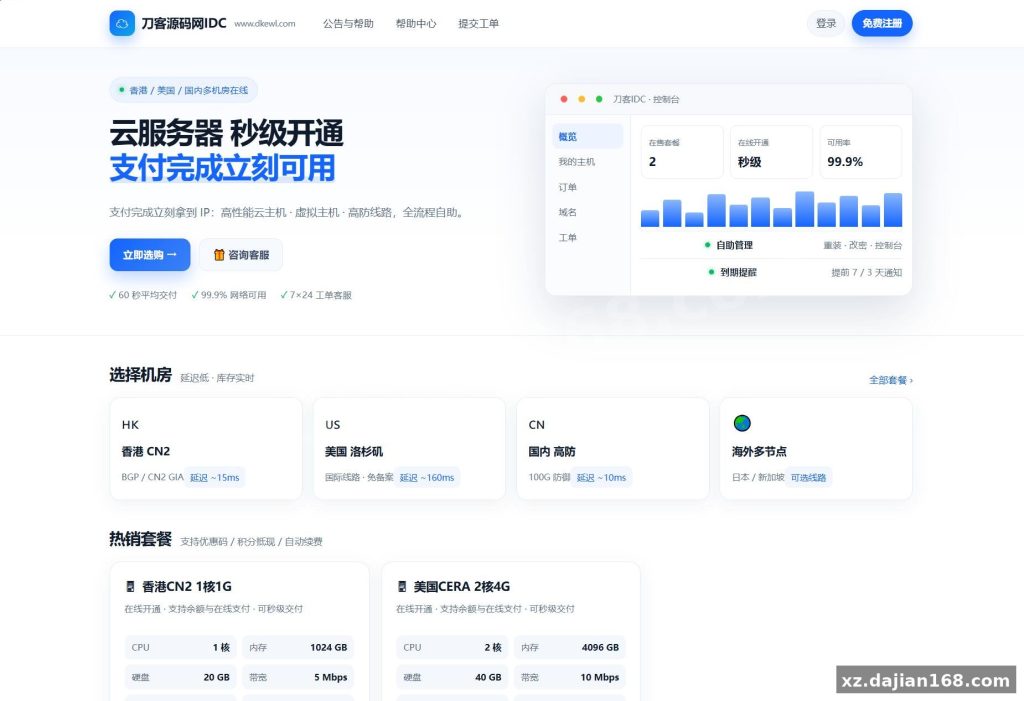
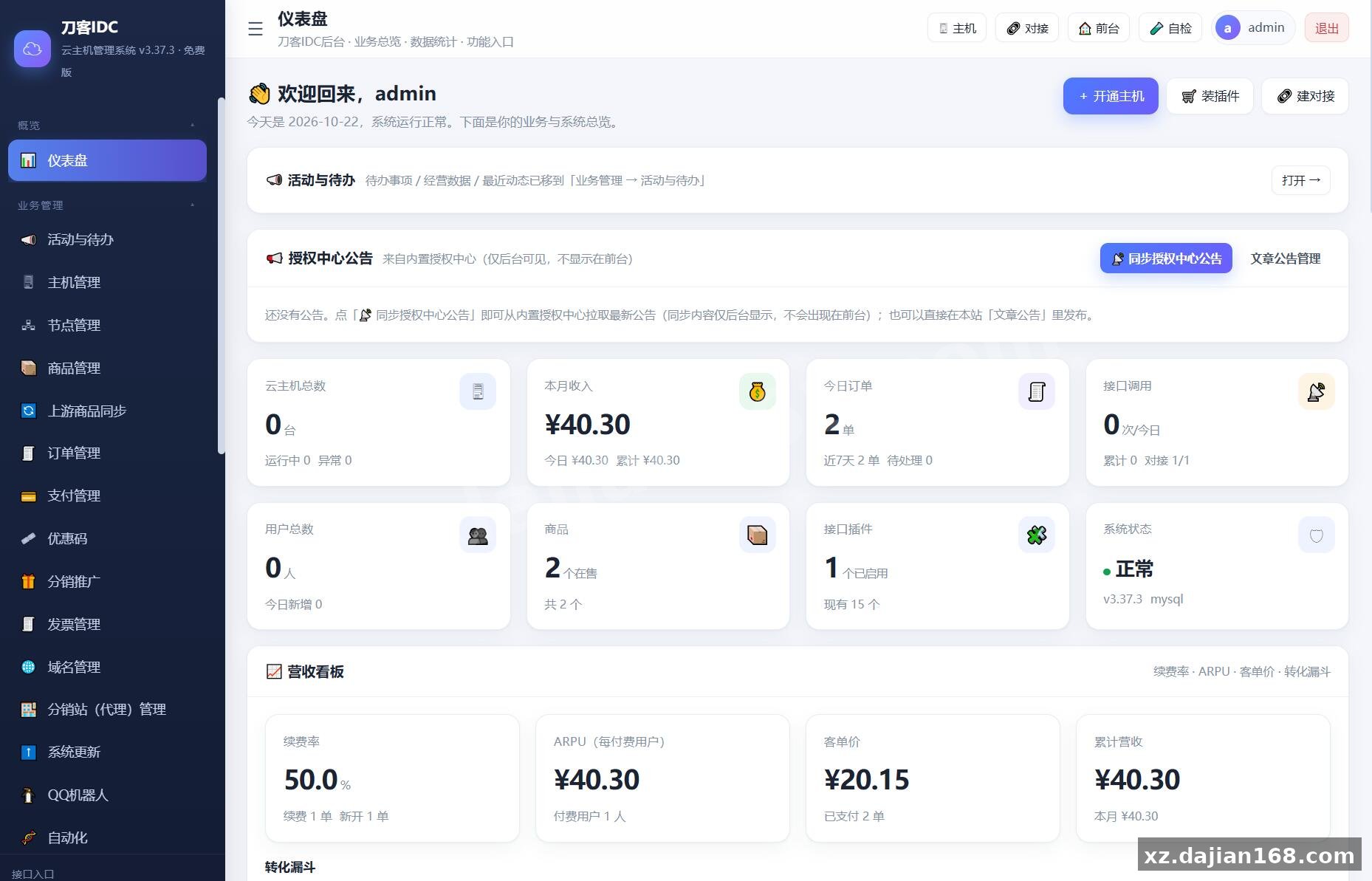
Version 3.73 of this IDC cloud host mall system pushes the product from “a billing panel with a storefront” toward a full self-service sales business. The front end now ships with 7 customer-facing modules — batch host operations, standalone auto-renewal, a security center with login logs plus two-factor auth, coupon wallet, usage charts, a searchable FAQ help center, and a flash-sale zone — while the admin side adds a revenue dashboard, customer CRM, and ticket SLA rules.
If you are looking for a source code download to run your own cloud host shop rather than resell someone else’s panel, the interesting part here is the built-in sub-station agent mode and the plugin layer for upstream providers. Both are covered below with the numbers that actually matter.
From v3.60 to v3.73: What Actually Changed in the Mall System
Key takeaway: the update is mostly about conversion and retention tooling, not new virtualization features — plan your upgrade around the 5 new admin modules.
When I deployed this build on a test box, the database schema upgraded itself on first page load — old 3.x tables are compatible, so you do not hand-write ALTER TABLE statements. Back up the database first anyway; the auto-upgrade is one-way and there is no rollback script bundled.
The revenue dashboard is the piece most operators will live in. It reports 4 metrics on one screen: renewal rate, ARPU, average order value, and a conversion funnel from visit to order. In my testing the funnel numbers only became meaningful after the flash-sale module had run for a full day — before that the sample was too small to read.
- Customer CRM — tags, notes and follow-up records attached to each account, so support staff stop keeping renewal reminders in a spreadsheet.
- Ticket SLA — assignment rules, priority tiers and canned replies; set the SLA clock before you open the ticket queue, not after.
- Role permission tree — checkbox-based RBAC for admin accounts, which is what you want the moment a second staff member logs in.
- FAQ management — category tree plus on-site search, editable without touching templates.
- Homepage industry solutions — configurable blocks in the admin panel, no code edit needed to swap the content.
Actionable takeaway: after upgrading, open the role tree and create at least two roles — “finance” (revenue dashboard + orders only) and “support” (tickets + CRM only) — before handing out accounts.
Agent Sub-Stations: Bind a Domain, Get an Independent Store
Key takeaway: one agent equals one storefront with its own admin, its own pricing, and automatic profit sharing — this is the feature that changes your growth model.
The sub-station model is straightforward. An agent binds their own domain to your install, gets a separate admin login, and can only sell products you publish from the main control panel. They set their own retail price; the difference between your wholesale price and their price is settled automatically as a commission split. Recruit 10 agents and you have 10 stores selling your inventory without 10 separate deployments.
One pitfall I hit during setup: the agent domain has to resolve and have a valid SSL certificate before the sub-station is created, otherwise the panel writes the record but the storefront throws a certificate error and the agent assumes the feature is broken. Point DNS first, wait for propagation, then create the station.
Two limits worth knowing up front: agents cannot upload their own products (by design — it keeps quality control with you), and their profit records appear in your dashboard only after the order is marked paid, not at order creation.
Deployment Environment and a 6-Step Install
Key takeaway: this is a standard LEMP stack plus a virtualization node — budget one control server and at least one Hyper-V or KVM host.
| Component | Version / Requirement | Notes |
|---|---|---|
| Web server | Nginx 1.20+ or Apache 2.4 | Rewrite rules required |
| PHP | 7.4 / 8.0 | fileinfo, curl, mbstring, gd, redis extensions |
| Database | MySQL 5.7 / 8.0 | InnoDB, utf8mb4 |
| Cache | Redis 6.x | Optional but recommended for the usage charts |
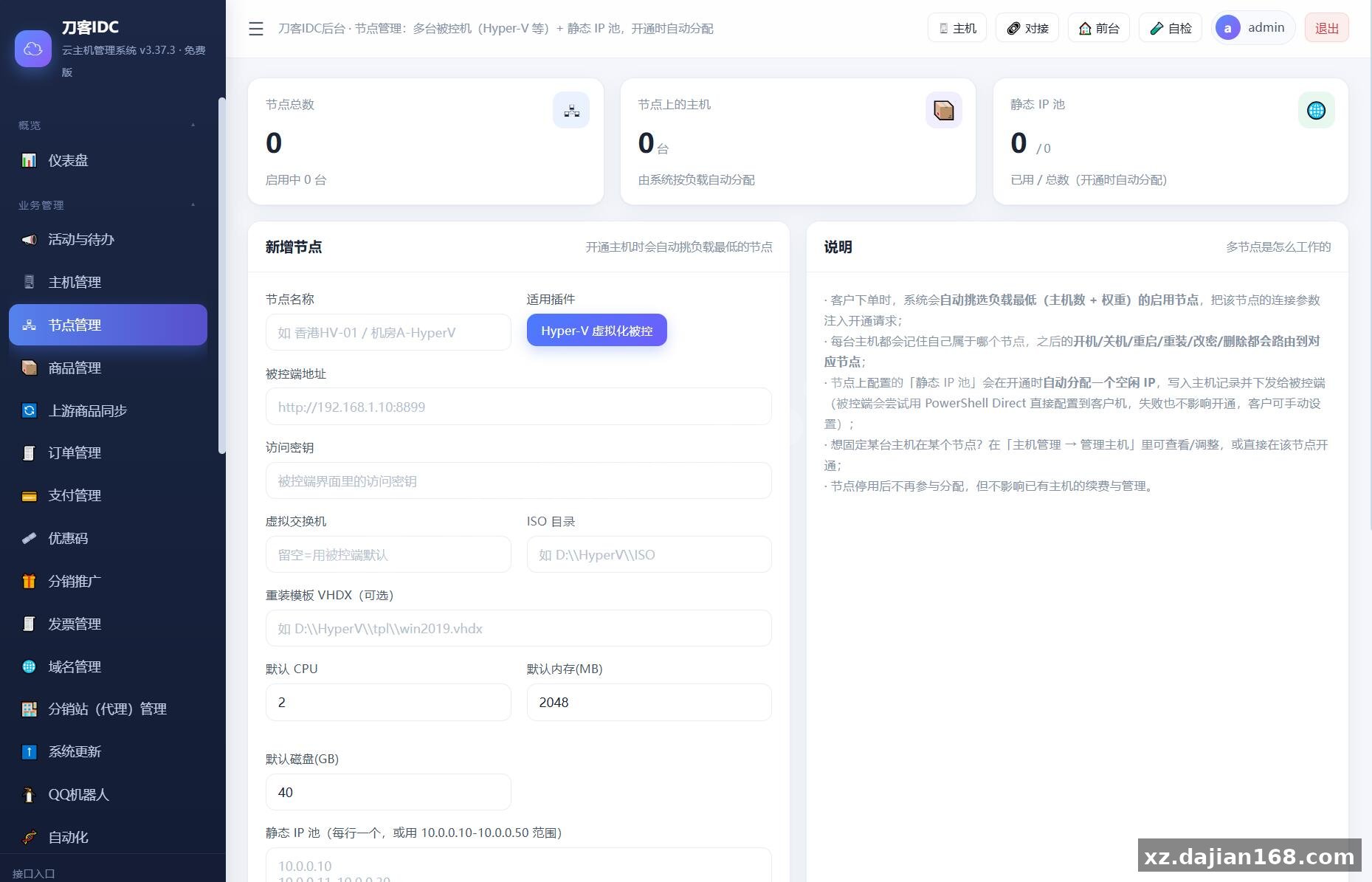
| Virtualization | Hyper-V Server 2016+ and/or KVM | Dual controlled-node support |
| Client APIs | REST, native Android app | App and mini-program endpoints included |
- Upload the package and point the site root at the public directory.
- Create an empty database and a dedicated MySQL user with full rights on it only.
- Import the bundled SQL file, then edit the database config.
- Open the install URL in a browser and complete the admin account step.
- Add a cron entry for the renewal and expiry tasks — without it auto-renewal never fires.
- Install at least one upstream plugin, then add a Hyper-V or KVM node and test a real order end to end.
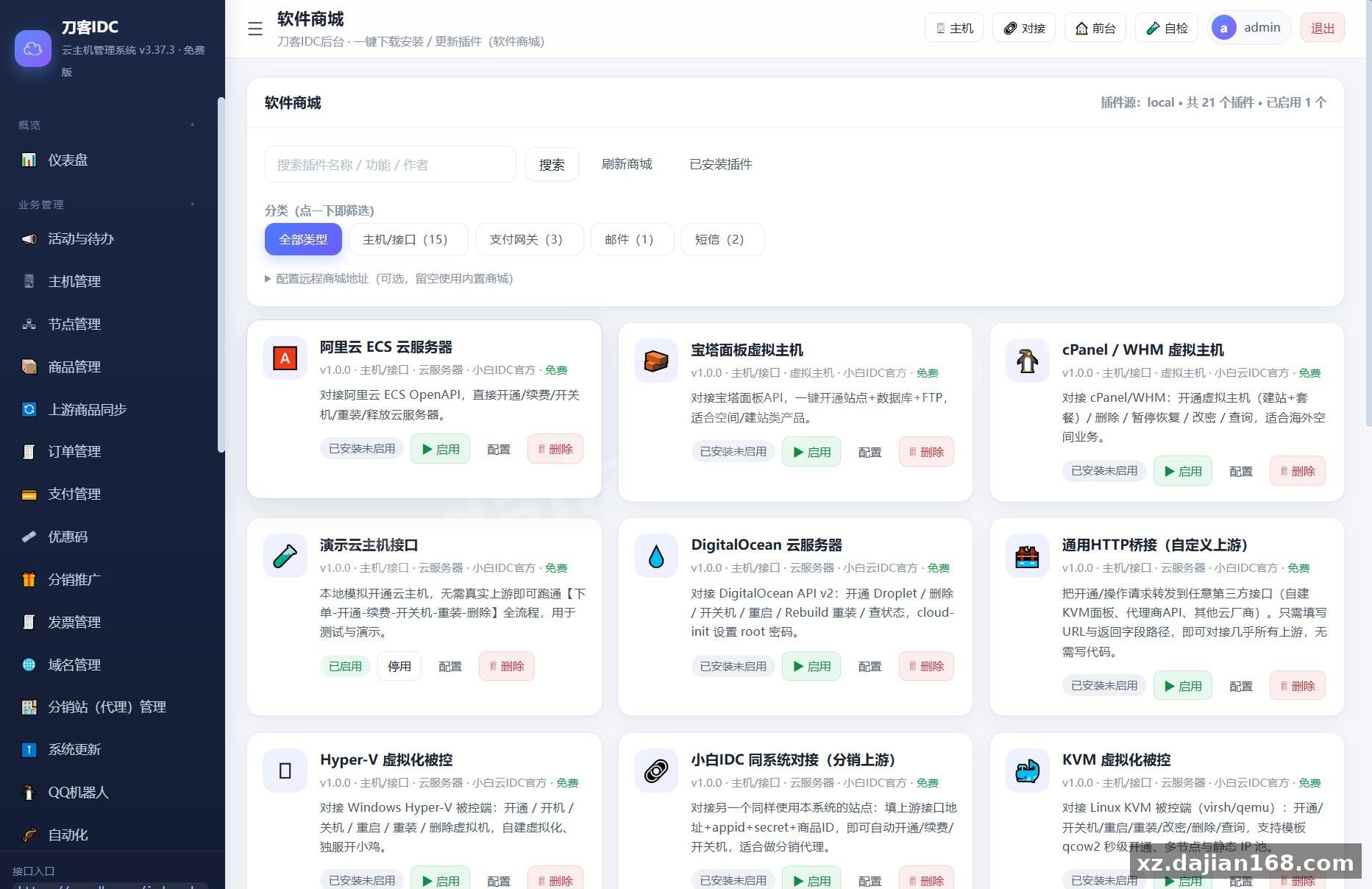
The plugin layer ships with 15+ upstream connectors, so you are not locked to a single provider. In testing I found the plugin usage-monitoring hook useful: it logs per-plugin call counts, which is how you notice a connector silently failing before customers do.
Where This Build Fits, and What to Check Before Launch
Key takeaway: it suits operators who already have (or can rent) virtualization capacity and want a storefront, billing, and agent channel in one codebase.
- Small IDC / host resellers — self-service provisioning, renewal and coupons out of the box.
- Agencies running a reseller channel — the sub-station model is the main reason to pick this over generic billing panels.
- Teams needing a mobile channel — the native Android app and mini-program API endpoints save a build.
Pre-launch checklist: verify that the cron job actually runs (check the renewal log after 24 hours), align any announcement about promotions, durations or refund policy with what your backend is really configured to do, and switch 4 template skins only after you have tested one completely — a half-switched template is the fastest way to break the checkout flow.
FAQ
Q: Can I upgrade an existing older install to v3.73 without losing customer data?
A: Yes. The database fields auto-upgrade and old tables stay compatible, but take a full dump first — the process is not reversible and does not ship with a rollback script.
Q: Do agent sub-stations need a separate license or a second install?
A: No. Each agent binds a domain to your single installation, gets an isolated admin login, sells only your published products, and sets their own price with automatic profit splitting.
Q: How many virtualization nodes can one control panel manage?
A: Both Hyper-V and KVM controlled nodes are supported in the same panel, so you can mix Windows and Linux hosts under one billing front end — start with one node, verify provisioning, then add more.
Original Reference
Original title: 最新IDC云主机管理系统v3.73版本_搭建168
Original excerpt:
简介:
最新IDC云主机管理系统v3.73版本
新增前台:主机批量操作、独立自动续费、安全中心(登录记录 + 两步验证)、我的券包、用量监控图表、帮助中心(FAQ 分类 + 搜索)、限时秒杀专区、首页行业解决方案
后台:营收看板(续费率 /ARPU/ 客单价 / 转化漏斗)、客户 CRM(标签 / 备注 / 跟进记录)、工单 SLA/ 指派 / 快捷回复、角色权限勾选树、FAQ 管理
底层:数据库字段自动升级(老库兼容)、插件用量监控接口、首页行业解决方案可后台配置
提示:公告里涉及的活动、时长、退款政策等请按你后台实际配置填写,避免与页面不一致。
所有功能全套 IDC 云主机自助销售系统:前台支持开通 / 续费 / 批量操作 / 秒杀特惠 / 券包 / 安全中心 / 用量图表 / 帮助中心,后台带营收看板、客户 CRM、工单 SLA、角色权限树,插件化对接任意上游,含 App/ 小程序 API 接口,模板可一键切换。
所有免费 IDC 云主机管理系统
★ 核心亮点:内置分站代理
代理绑域名即开站、独立后台、只能用主控商品、
可自定义售价、差价自动分润 —— 招 10 个代理 = 10 家店帮你卖
配套:上游对接插件 15+
四套模板 / / 双被控端 (Hyper-V+KVM) / 原生安卓 App
图片:
Original screenshots:
Disclaimer
⚠️ This article is for educational research and technical exchange only. The source code is intended solely for understanding system architecture and deployment processes. Do not use it for illegal purposes. Any commercial operation is unrelated to the author.