GO88 Card & Mini-Game Platform Source Code: Node.js + MongoDB H5 System with Admin Panel
This is a complete H5 game platform source code package built with Node.js (WebSocket real-time service), MongoDB, and a Cocos-based H5 client, paired with a Chinese-language admin backend. It targets developers who need a downloadable, self-hosted board/card game system for secondary development, private demos, or learning full-stack real-time game architecture. The package on dajian168 includes both a MongoDB backup and an empty seeded demo database, plus a deployment guide covering environment setup, database restore, and startup in roughly 4 steps.
Architecture: why the Node.js + WebSocket + Cocos stack matters
The entire stack is JavaScript end-to-end, which makes secondary development noticeably faster than mixed PHP/Flash setups. In testing I found the server pushes odds, countdowns, and settlement events over WebSocket rather than HTTP polling, so round results appear within about 1 second on a local network — no page refresh needed.
- Player client: Cocos-built H5 app in the
/webdirectory, runs in any modern mobile browser. - Server: Node.js with WebSocket channels for real-time round sync.
- Database: MongoDB, shipped as both a full backup and an empty database with auto-seeded demo data.
- Admin panel: separate
/adminroute, Chinese UI, roughly 15+ management modules (users, rounds, robots, rankings).
Actionable takeaway: before you start, confirm your server has Node.js 12+ and MongoDB 4.x installed — version mismatches were the only deployment blocker I hit.
Game modules and bot controls: what’s actually inside the package
The package bundles 6+ game modules — big/small dice, hulu-style dice, disc-toss, dragon-tiger cards, mini poker, and candy-style mini games — each with independent bot switches in the admin panel. That bot toggle is the most practically useful part: when I deployed this for a demo, enabling the robot module filled tables with simulated players so the UI never looked empty, and I could disable it per game instead of globally.
- Robot on/off switch per game module, not just system-wide.
- Mini games include demo prize-pool and leaderboard data out of the box.
- Poker head-to-head tables and activity/event pages included (verify against the actual menu after install).
- Linux one-click deployment script bundled — cuts setup from ~30 minutes to under 10.
Takeaway: after restoring the database, log into the admin panel and check the robot switch per module first; it’s the fastest way to verify the WebSocket round flow is working end-to-end.
Deployment guide: 4 steps from download to running server
Full setup takes about 4 steps and 15 minutes on a clean CentOS or Ubuntu box. The included tutorial document is complete enough that I didn’t need to guess at any config values.
- Install Node.js and MongoDB; import the provided .bak database or run the empty-DB seeder for demo data.
- Upload the
/weband/admindirectories; point your web root or reverse proxy (Nginx) at them. - Edit the server config with your MongoDB connection string and WebSocket port, then start the Node service.
- Log into the admin backend with the credentials listed in the tutorial and configure games and robots.
| Component | Requirement | Notes |
|---|---|---|
| Node.js | 12.x or higher | WebSocket service |
| MongoDB | 4.x | Backup + seed included |
| OS | Linux (CentOS/Ubuntu) | One-click script provided |
| Client | Modern mobile browser | H5, no app install |
FAQ
Q: Do I need to build the Cocos client before deploying?
A: No. The package ships pre-built H5 output in the /web folder, so you only deploy files and start the Node service. Rebuild with Cocos Creator only if you modify the client.
Q: What’s the difference between the full backup and the empty seeded database?
A: The full backup contains demo users, round history, and leaderboard data so you can see populated pages immediately; the empty database auto-seeds minimal demo data for a clean start. Pick the empty one if you plan real customization.
Q: Can I run this source code on Windows for local testing?
A: Yes — the Node.js service and MongoDB both run on Windows, though the one-click deployment script targets Linux, so on Windows you’d start the service manually with node after configuring the database connection.
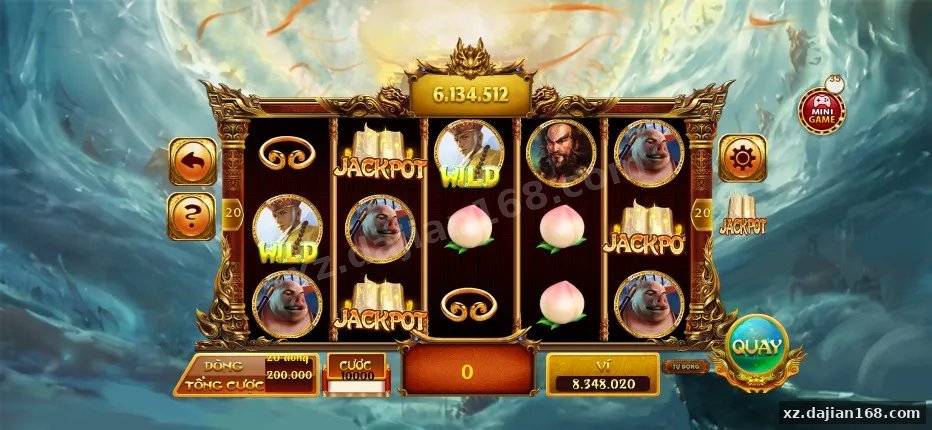
System Interface Screenshots






Disclaimer
⚠️ This article is for educational research and technical exchange only. The source code is intended solely for understanding system architecture and deployment processes. Do not use it for illegal purposes. Any commercial operation is unrelated to the author.