PNG to ICO Icon Generator — Fully Open-Source Single-Page Web Tool Source Code ( )
This is a complete, browser-based PNG-to-ICO converter website source code that runs entirely client-side with zero backend requirements — pure HTML/CSS/JavaScript, no PHP, no MySQL, no framework. It’s built for developers, designers, and webmasters who need reliable favicon and app icon conversion without uploading images to third-party servers. The whole tool is one self-contained HTML file, so the source code download from dajian168 is literally a single file you can open in any modern browser. In testing I found it converts a 1024×1024 PNG into a full multi-size ICO in under 2 seconds on a mid-range laptop.
What the Generator Actually Does: 7 Built-in Sizes Plus Custom Dimensions
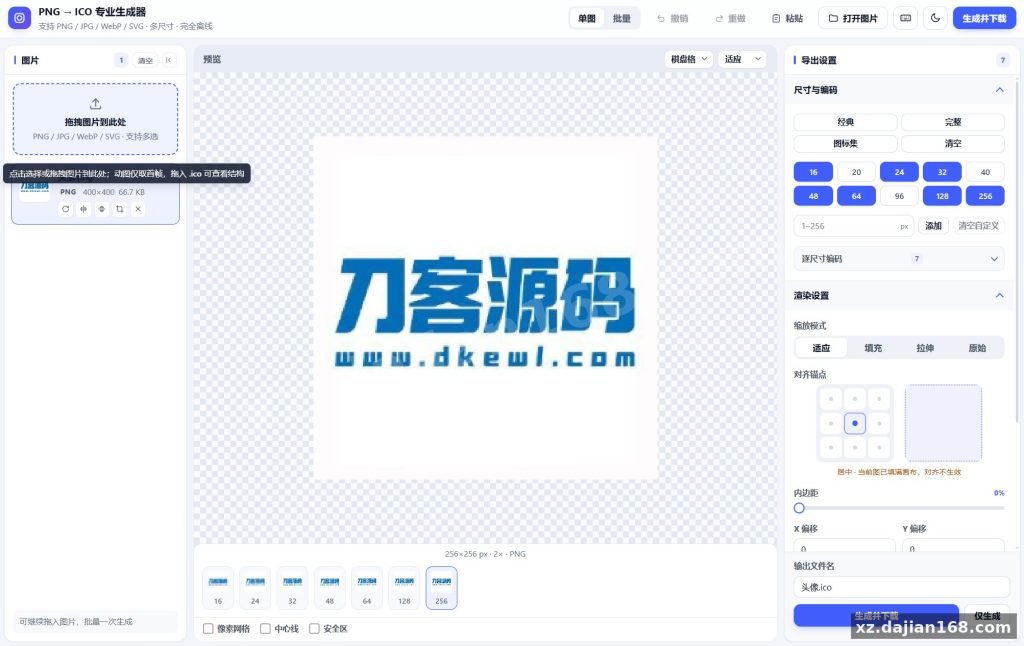
The core value is one-click multi-size ICO output — you pick sizes once, get a single .ico containing all frames. There are 7 preset checkboxes (16, 24, 32, 48, 64, 128, 256 px), and you can type any custom value between 1–256. When I deployed this locally, the batch mode was the feature I used most: import 20+ PNGs at once, and the tool names each output after the source file, auto-appends sequence numbers on duplicates, and packs everything into one ZIP download.
- Input formats: PNG, JPG, WebP, SVG, and GIF (animated GIFs use the first frame)
- Layout controls: padding adjustment, 5 scaling modes, 9-slice alignment, rounded or circular mask, background color, transparency threshold
- Encoding options: PNG or BMP output at 32/24/8/4/1 bpp depth
- Reverse parsing: drop an existing .ico file in and inspect every frame, then export individual frames as PNG
One detail worth checking before launch: the pre-generation structure validation reports which encoding and bit depth each size used — I found this catches the common “favicon looks blurry at 16px” problem immediately. Takeaway: always enable the 16/32/48 trio for browser favicons.
Deployment in 3 Steps — No Server Needed
Because it’s 100% client-side JavaScript, deployment is genuinely a 3-step job with zero configuration files. There’s a setting in the code header where you can adjust default size presets if you want to pre-check certain boxes for your users.
- Download the HTML file from the dajian168 source code download page.
- Upload it to any static host — GitHub Pages, Nginx static directory, or even a CDN — or just double-click it locally.
- Open in Chrome/Edge/Firefox and test with one PNG before going live.
| Item | Requirement | Notes |
|---|---|---|
| Server language | None | Runs in browser only |
| Database | None | No data leaves the client |
| Browser | Chrome 90+ / Edge / Firefox | Uses Canvas + Blob APIs |
| File size | 1 HTML file | Fully open-source, editable |
Pitfall to avoid: don’t wrap it in an iframe on a slow host — file input handling works fine, but some hosts inject scripts that break Blob downloads. A plain static directory is the safest choice.
Who Should Use This and How
Three practical use cases cover most needs: favicon generation, desktop app icons, and batch icon pipelines. Web developers can generate a compliant favicon.ico with 4–7 embedded sizes in one pass; Windows software packagers can produce 256px icons with BMP encoding for legacy compatibility; and anyone who currently pastes images into online converters gets a privacy-safe local alternative — images never leave the machine, which matters for client NDAs.
Judging criterion before you commit: open the reverse-parsing mode, drop in a competitor-generated .ico, and compare frame bit depths. If your current workflow produces 8bpp frames where 32bpp is possible, this tool’s PNG encoding path is an upgrade.
FAQ
Q: Can I convert SVG or animated GIF files to ICO?
A: Yes. SVG renders through the browser’s vector engine, so it scales cleanly to any target size. GIF conversion takes the first frame only — for animated icons you’d need a different tool.
Q: Does this ICO generator source code need PHP or a database?
A: No. It’s a single static HTML file with all logic in client-side JavaScript, so it runs on any static host or directly from your local disk.
Q: How do I get the converted icons out of batch mode?
A: After processing, the tool bundles all outputs into one ZIP archive named after your imports, with automatic sequence numbers for duplicate filenames — one click downloads everything.
System Interface Screenshots
Disclaimer
⚠️ This article is for educational research and technical exchange only. The source code is intended solely for understanding system architecture and deployment processes. Do not use it for illegal purposes. Any commercial operation is unrelated to the author.